Introduction
Exhibitors who attend a Reed Exhibitions show need to do certain actions before a show begins. One of those actions is to have the ability to assign badges to participants as well as manage them. Part of the team I was in responsibilities covered this remit and bordered the registration solution but being for exhibitors.
As the project was being conducted during the lockdown and Covid-19 times, accessing specific users was tricky. The plan was to launch with functionality then to interview and user test for further iterations.
Discover
Working closely with business analysts we went through the different user types and the scenarios. It was at this point that I helped start to mock up something tangible in order to progress the work.

It was not the most ideal way to work as accessing users for testing was not possible in the time frame we were looking at. However, the interaction and functions themselves were based on the needs of what users would have normally done before, but we would be lacking usability testing. For me, the biggest difficulty to understand, was users of this products way of interacting, what order would someone do things, would they use this several times, was this a one and done kind of area? I had my team and also another part of Reed Exhibitions to understand the business perspective, but the user perspective was the one lacking.

The Badge management functionality would sit within an area that existed digitally. This area, known as the Exhibitor Hub, provided navigation and areas that were predominantly used by exhibitors for getting ready for a show, but would also provide tools for post show i.e. data playback of how the show was the exhibitor.
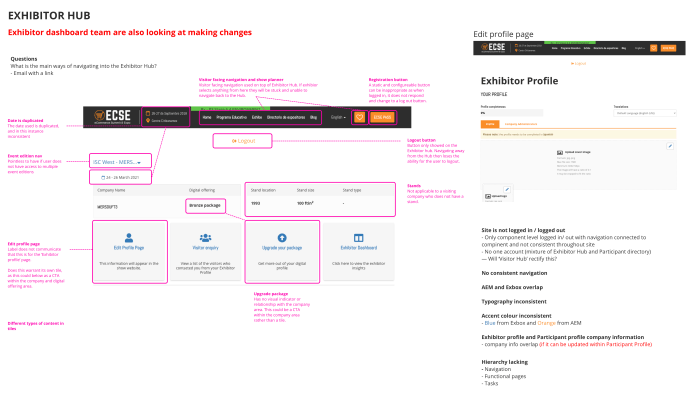
An issue with the Exhibitor Directory build, was that there were two systems that for some reason had overlapped. This meant that there were a lot of inconsistencies but also visitor and exhibitor functionalities overlapping meant that, if an exhibitor navigated within the visitor navigation, they would not be able to navigate back to the exhibitor section. Additionally the header itself did not adapt if the user was logged in, as the ‘log in’ button was still present. There was an opportunity here to help fix this within the Exhibitor Hub but also make sure the environment did not compromise the badge management experience as well.
Define
At the beginning of the project, there were different types of ‘entitlements’ that a user could assign to their employees and companies.
Originally the aim was to put them all into one section. However during the early stages of mocking up a solution, it was clear due to differences in entitlement types, that badges would belong in their own area, which would be known as Badge manager.
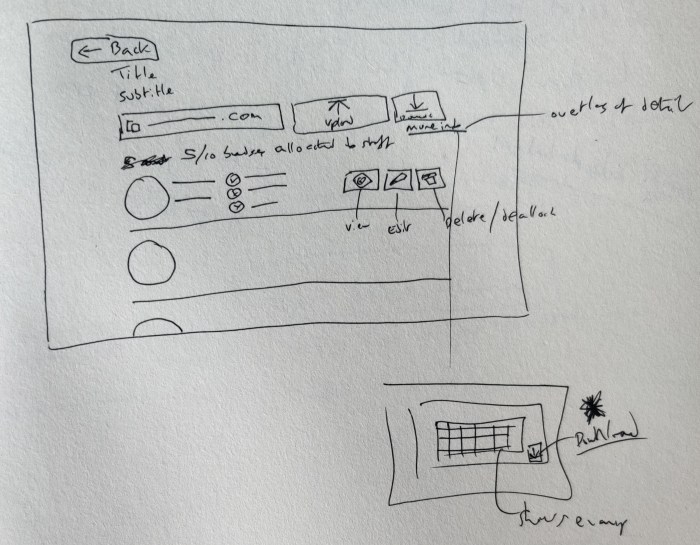
The capability needed for assigning badges would be via a spreadsheet uploader, which initially I was concerned about. However, it was known that users who assigned badges and registered others would generally be submitting spreadsheets. It meant the user could upload as many peoples details as needed in one go, rather than entering manually.
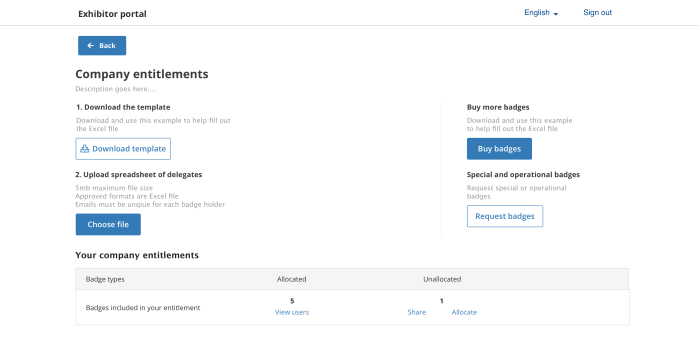
I looked at different ways in which the uploader could be shown. Part of it would be to include a template. This made logical sense to be the first step so that the user could download a template and populate, rather than making their own spreadsheet from scratch and struggling to enter.
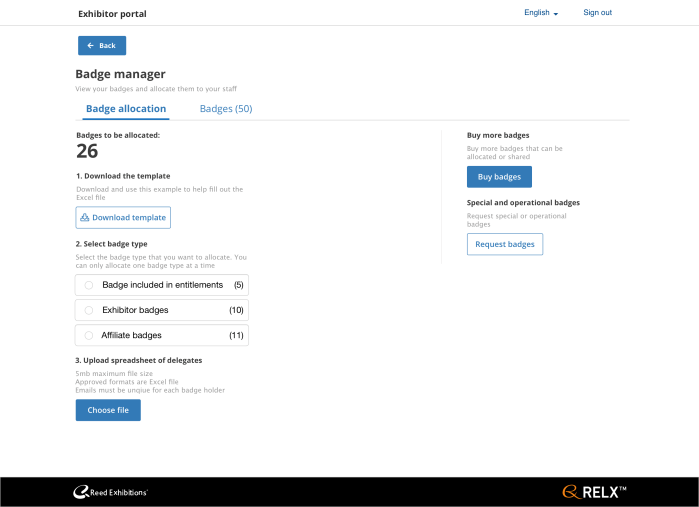
Having mockups of potential pages and interactions were very useful when workshopping with stakeholders. This would then help us align on what we were looking for and how it would be useful for the user. Once the initial structure was agreed it was time to detail out and begin to develop the ideas further.
Develop
Once the fundamental content was understood, it was time to iterate and refine. A mixture of discussions and workshops helped to identify additional requirements, content understanding and edge cases.
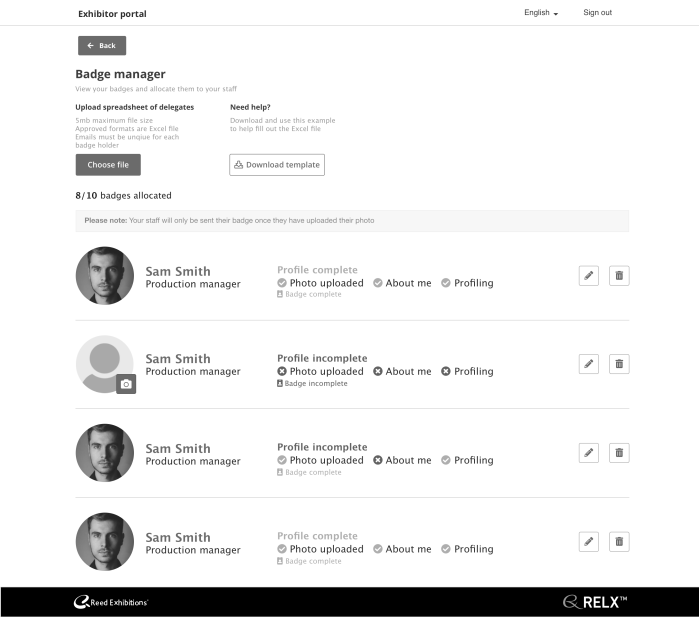
At this point it was time to collaborate with the developers to get their feedback and understanding. This was good for basic testing for us to see if they understood what the product was doing.

Deliver
After working as a team and with stakeholders it was time to wrap up the designs for the first build. At this point going forward I worked with the developers to guide the design and make changes if required.
One of the pieces of the work was the house keeping of sorting out the header. For a short term solution the header would be built for the exhibitor hub area. The improvements made were:
- Removing the Visitor facing navigation
- Removing the Logout button and swapping the Register button in the header
- Removing the Show planner (that is for visitors only)
- One accent colour
- Building a navigation that would appear only in the Exhibitor hub, which would use the same patterns visually, but would be a component owned by the Mercury team
Existing header

New header

Badge manager
Designs for the Badge manager.
Allocate Badges page
User has the ability to register other exhibitors from their company allocating badges, as well as being able to allocate badges to sharer companies. User also has the ability to purchase more badges if required
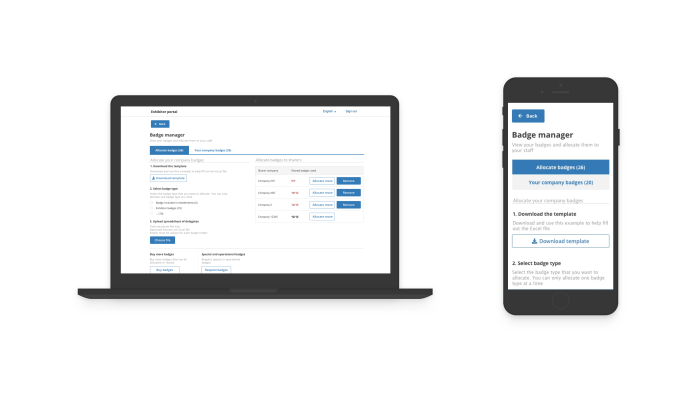
Company badges
User here manages peoples badges in relation to their company. Here they can see the status of the users badge if it’s complete. This is mostly to either chase users to update, or have the ability to do it themselves. At the top they will see the badges that require updates for completion.

Allocate badges to company
The user also has the ability to allocate badges to other sharing companies. This can range from one to many different companies, so the design, working alongside tech went into detail of how that would work on different screen sizes.
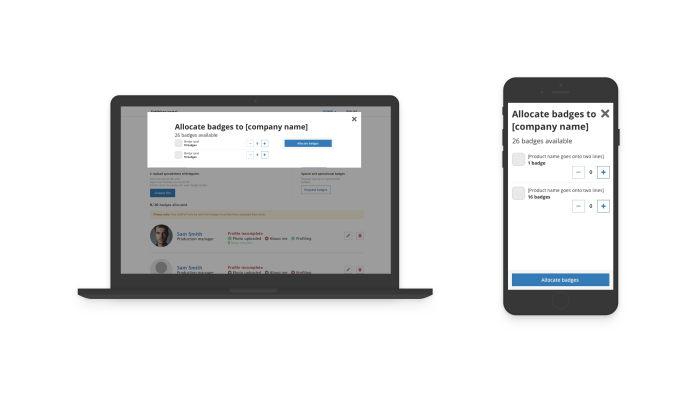
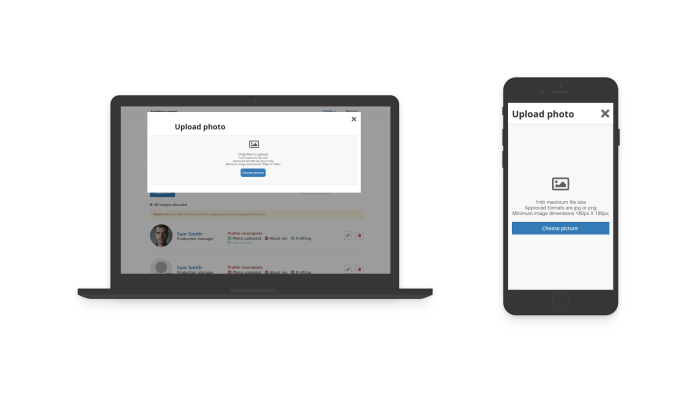
Photo uploader
For badge completion, every user will need to upload a photo. The photo uploader is simple to use giving clear error messaging, the ability to drag and drop images, and the ability to crop images, optimised for different screen sizes.
Future
The main strategy for this project was to build a proof and concept and put live as an experiment. At this point data will be available to show performance and a series of qualitative testing will be undertaken as well as conducting interviews in order to get feedback from real users who used the interface for the pilot show. It is not the ideal way of doing things, but with the awareness and understanding within the business that this is the approach, this can be treated as an experiment for then the next iteration to apply more of the design process.
Just before I left I wrote a short discussion guide to test the badge manager with internal show teams to quickly gain insights with the idea of making small tweaks to help before the show goes live, then develop further for the next show.
Other Reed Exhibitions projects
 Antony J White